Manipulating fields using the PROC command
ABCD and its underlying technology (CISIS) allow for extremely powerful data manipulation through formatting files and processing scripts (.prc). By using the mx utility and the proc function, it is possible to completely restructure the records of a database.
This page documents the Interactive Conversion Interface (which automates the application of PRC scripts) and provides the Advanced Technical Reference for building conversion rules and structuring MARC databases.
1. Interactive PRC Conversion Interface
Historically, massive data conversion (for example, after importing a delimited TXT or CSV file) required executing mx commands in the operating system's command line.
To streamline this workflow, ABCD provides an interactive post-migration web conversion interface. This tool allows database managers to test and apply conversion scripts visually and safely. To access this, select a database from the home screen and click on Utilities > Export/import > Modifying a record using the PROC command.
How to Use the Interface
The process is divided into three guided steps:
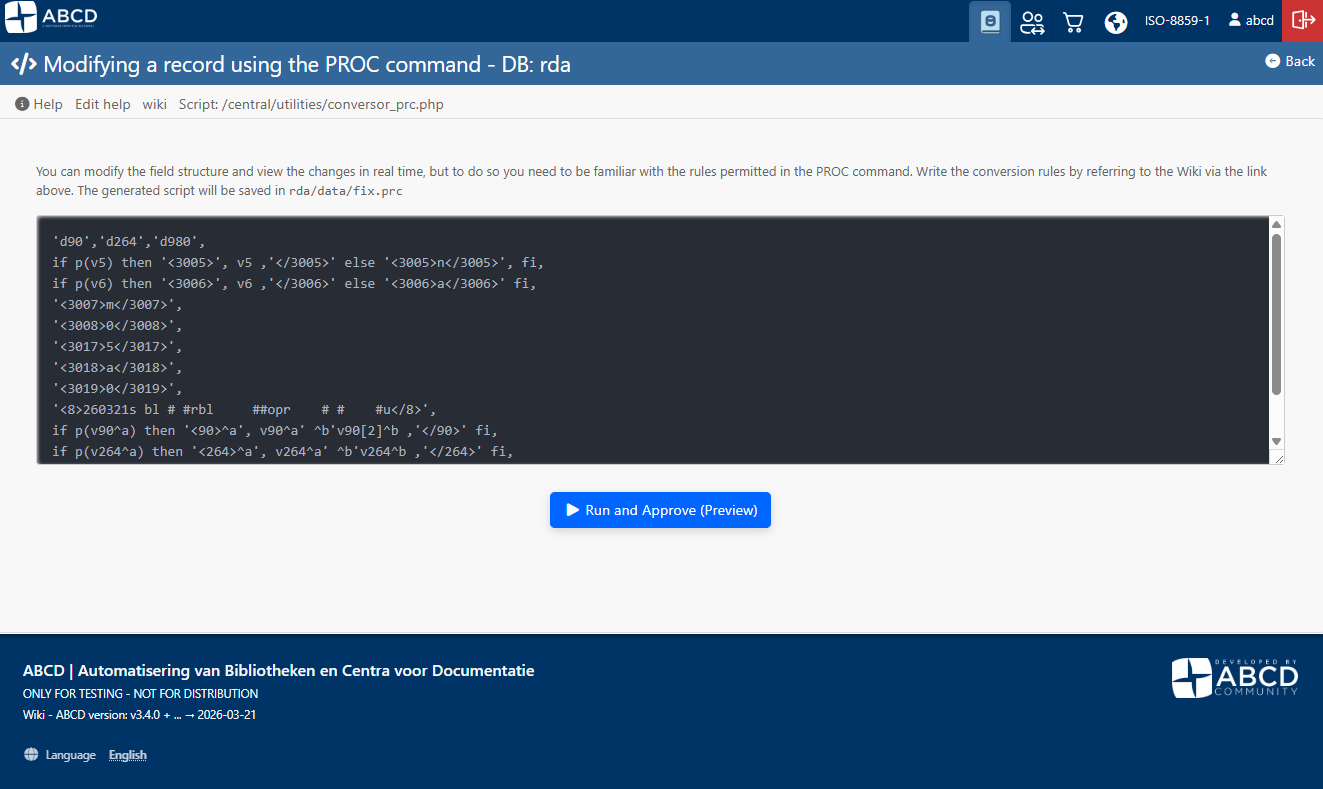
- Write the Conversion Script (PRC Rules):
- In the text editor box, enter the formatting language (PFT) rules that will dictate the modifications to the records.
- The typed script is automatically saved to the
fix.prcfile within the database's data directory.
-
Run and Preview (Homologation):
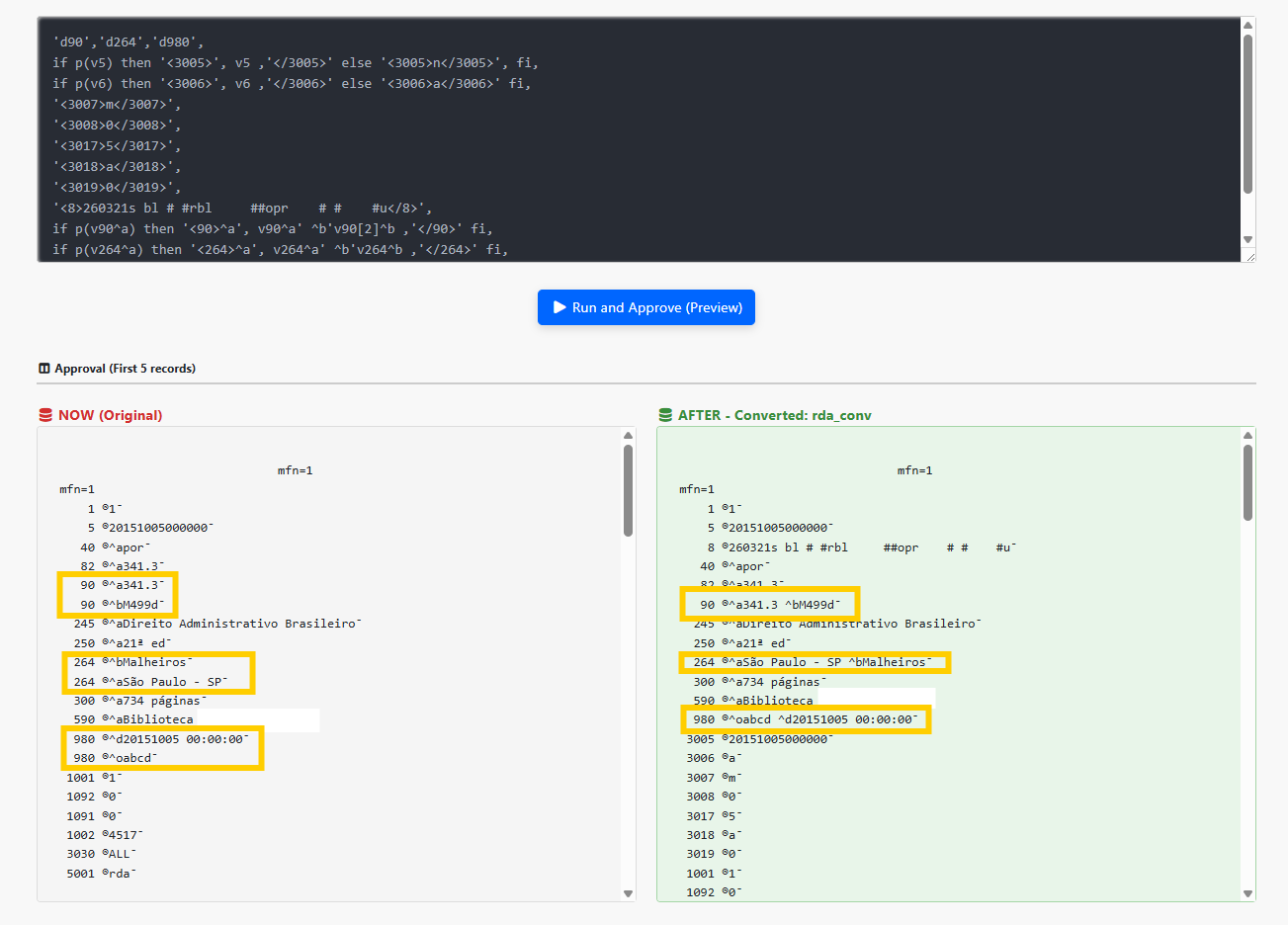
- Clicking the preview button does not alter your main database. Instead, it generates a temporary database (e.g.,
rda_v1). - The interface processes the first 5 records and displays them side-by-side in the Preview section:
- BEFORE (Original): The record as it currently exists in the database.
- AFTER (Converted): How the record will look after the script is applied.
- This environment ensures that tags, subfields, and fixed positions are mapped correctly before affecting the entire collection.
- Clicking the preview button does not alter your main database. Instead, it generates a temporary database (e.g.,
-
Commit Conversion:
- If the preview results are correct, the manager clicks Commit Conversion to Main Database.
- Safety: The system automatically creates a backup of the original database (creating the
_ori.mstand_ori.xrffiles) and replaces the main files with the converted version.
2. Technical Reference: The proc Command and fldupdat()
The logic used in conversion scripts relies heavily on the proc function. The proc parameter allows you to specify, through a PFT format, modifications to be performed on the fields of the source record.
Fundamental Concept: Modifications are not made directly to the source database, but rather in memory or in the destination database. If a destination database is not specified, the changes might be seen on the screen but will be lost after execution.
Limits and Recursion
- It is possible to specify up to 1024
proc=parameters in a single MX command line. - Each successive
procwill act upon the record in its current state; meaning, if a previousprocmodified the record, the next one will process the resulting data from that modification. - A
proccan be included inside anotherproc(recursive calls) without limits.
Basic fldupdat() Syntax
Below are the commands natively accepted by the function governing proc:
| Command | Description | Example |
|---|---|---|
d. | Logically deletes the record. | proc='d.' |
d* | Deletes all fields in the record. | proc='d*' |
dtt | Deletes all occurrences of the specified tag tt (e.g., Tag 26). | proc='d26' |
dtt/occ | Deletes only a specific occurrence occ of the tag tt. | proc='d26/3' |
att#str# | Adds the string str as a new occurrence of tag tt. The separator # can be any non-numeric character as long as it does not occur in the inserted data. | proc='a999#cds#' |
htt n str_n | Adds the string str_n of length n (in bytes) to tag tt. | proc='h99 8 CDS/ISIS' |
=<mfn> | Replaces the record number (MFN) with a new value n. | proc='=10' |
s<tag> | Sorts the record's directory entries by the numeric tag. | proc='s' proc='s70' |
⚠️ Golden Rules of proc
- Within the same
procparameter, all delete commands (d) must precede the add commands (a,h, etc.). - Do not use two or more delete commands by occurrence (
dtt/occ) for the same field in the same call. - The
=command (MFN substitution) and thescommand should not be mixed with other commands in the sameproc.
Advanced Functions and Integrations
For complex migrations, CISIS offers extended syntaxes and database integration functions:
<TAG>data</TAG>: Addsdataas a new occurrence of theTAGfield. This function allows the use of parameters to remove markup lengths (stripmarklen) and impose minimum lengths (minlen).x[append=]<mf>: Writes the data of the current record into the specified master file<mf>.r<mf>,<mfn>: Looks up the corresponding<mfn>in another database (<mf>) and includes its fields in the active record.g<gizmo_mf>[,<taglist>]: Applies a replacement database (Gizmo) over the record or over a specific list of tags.gsplit[/clean]=<tag>[=<criterion>]: Extracts and partitions fields into new occurrences based on separators (char), words (words), letters, numbers, or trigrams.gload/gdump: Used to load or extract binary files into/from a specific tag.
3. Practical Model: Building a Generic MARC Leader
By utilizing PFT conditional statements combined with the XML-style inclusion concept (<TAG>data</TAG>) understood by MX, it is possible to create advanced logic to migrate local fields to the MARC 21 standard.
The practical script below illustrates the deletion of old fields (like 90, 264, 980), the conditional inclusion of formatted variables, and the manual structuring of a generic Leader (Fixed Field 008) for migrated works.
'd90','d264','d980',
if p(v5) then '<3005>', v5 ,'</3005>' else '<3005>n</3005>', fi,
if p(v6) then '<3006>', v6 ,'</3006>' else '<3006>a</3006>' fi,
'<3007>m</3007>',
'<3008>0</3008>',
'<3017>5</3017>',
'<3018>a</3018>',
'<3019>0</3019>',
'<8>260321s bl # #rbl     ##opr    # #    #u</8>',
if p(v90^a) then '<90>^a', v90^a' ^b'v90[2]^b ,'</90>' fi,
if p(v264^a) then '<264>^a', v264^a' ^b'v264^b ,'</264>' fi,
if p(v980) then '<980>^o', v980^o' ^d'v980^d ,'</980>' fi,
Structure Analysis:
- Deletion Priority: The instructions
'd90','d264','d980'open the script, ensuring that the raw original data does not collide with the organized recreation of the tags. - Fixed Definitions (
<8>): In tag<8>, the fixed-length field is assembled following the MARC guide for Dates, Country of publication (bl), Language, and Cataloging source. Placeholders and literals (likesfor single date) are mapped in plain text. - Conditional Mapping (
if p()): The script evaluates the existence of the variable; if it exists, the instruction wraps the complete tag with proper subfield formatting (e.g.,^aand^b), while also respecting occurrences through array indices (e.g.,v90[2]^b).
4. The XML <proc> Element
Beyond being used directly via scripts passed to mx in the conversion utility, the proc command can be invoked natively by ABCD in XML-structured architectures.
The <proc> element allows you to modify the content of the record currently loaded in memory, subjecting it to ISIS Formatting Language (PFT) rules.
Unlike the <display> element, which sends the output directly to the screen (browser) or a file, the <proc> element executes the PFT blindly and applies the results internally to the record's fields.
XML Usage Rules
- Allowed content: The element must exclusively enclose
<pft>tags. - Parent Elements:
<do>,<function>,<hl>,<loop>,<section>,<update>.
XML Syntax and Example
Below is how the XML environment wraps the same formatting seen in fix.prc scripts:
<proc>
    <pft>PFT_INSTRUCTIONS_HERE</pft>
</proc>
In this example, the script processed by the XML deletes the original 2024 field and restructures its value by attaching a prefix 'a' and concatenating the content of field 2027 at the end, separated by ~:
<proc>
    <pft>
        'd2024',
        'a2024~', v2024, '~', v2027, '~'
    </pft>
</proc>